3 minutes
The BreakingBet API is a programmatic interface that lets you receive service data directly, without using the website. The same data types are available through the API: arbitrage opportunities (surebets), value bets, and middles.
Table of contents
BreakingBet API overview
The API is designed for bot developers, analytics platforms, monitoring systems, and anyone who wants to integrate BreakingBet data into their own tools.
What is available through the API
Each data type is represented by a separate service in two modes — prematch and live:
- Arbs (Surebets) — arbitrage opportunities across bookmakers with guaranteed profit.
- Valuebets — outcomes with inflated odds.
- Middles — opposing bets that can win simultaneously.
Data is updated every 1–3 seconds.
Requirements
To use the API you need:
- An active API subscription (separate from the website subscription).
- Basic knowledge of HTTP requests and JSON.
- A tool for making requests (curl, Postman, any HTTP client or programming language).
How to subscribe to the API
Go to the API pricing page. Unlike regular plans, the API subscription is configured individually:
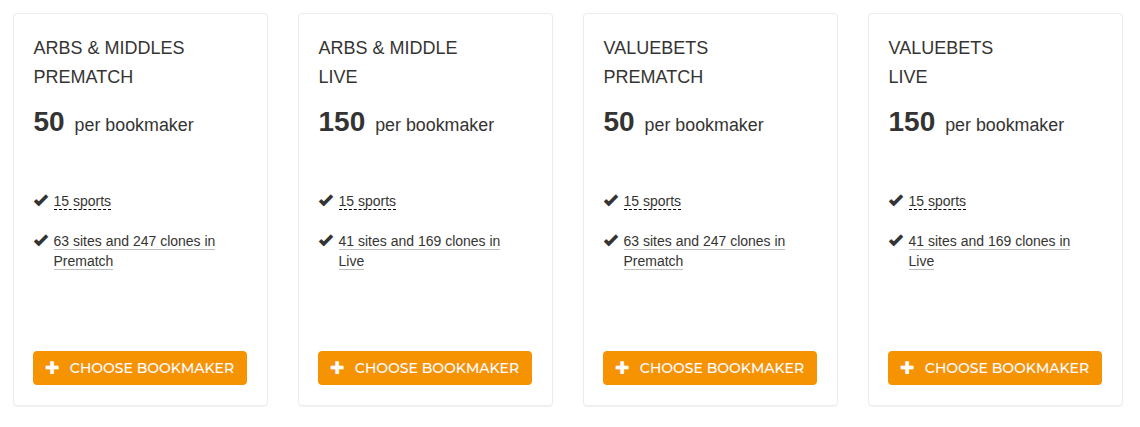
- You select specific services (arbs prematch, arbs live, valuebets prematch, valuebets live).
- For each service you choose the bookmakers you need (minimum 2, maximum 10).
- The price is calculated per bookmaker per service.
- The subscription lasts 30 days.
Before purchasing, you can request demo access — contact us.
General workflow
Working with the API consists of five steps:
1. Obtaining access keys
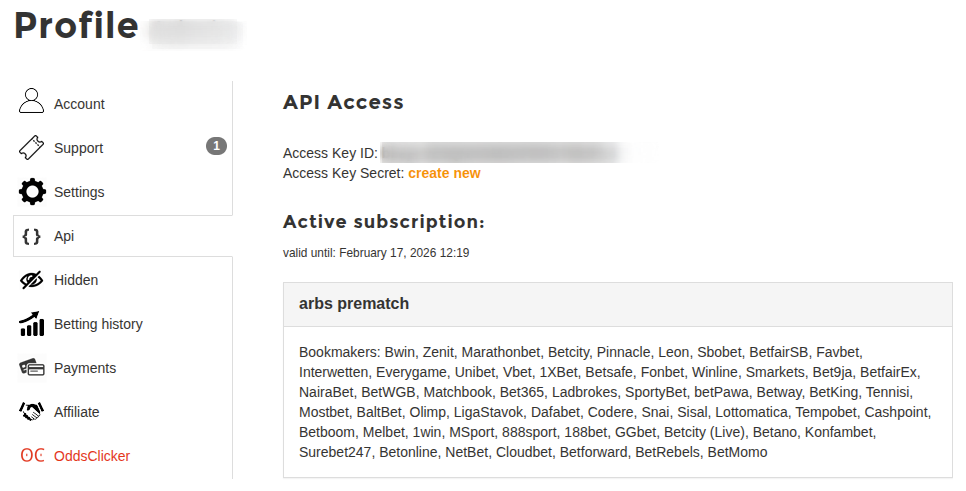
After subscribing, go to the API section in your profile. There you will find:
- Access Key ID — your permanent key identifier.
- Access Key Secret — the secret key for authorization. It is shown only once — save it in a secure place. You can generate a new one if needed.
2. Obtaining a token (Access Token)
A short-lived token is required for each data request. You can obtain it with a POST request:
curl https://breaking-bet.com/access_keys/{ACCESS_KEY_ID}/access_tokens -H "Content-Type: application/json" -H "Authorization: ApiKey {YOUR_SECRET_KEY}" -d '{"service": "arbs_prematch"}'Available service values:
-
arbs_prematch/arbs_live -
valuebets_prematch/valuebets_live -
middles_prematch/middles_live
The token lifetime is 5 minutes. You need to request a new one after it expires.
3. Configuring a filter
Before retrieving data, you need to configure a filter — set selection criteria (sports, bookmakers, profit range and other parameters).
4. Retrieving data
Data requests are sent to the corresponding service host. For example, for prematch arbs:
POST https://arbs.prematch.api.breaking-bet.com/filters/{ACCESS_KEY_ID}/itemsService hosts:
-
arbs.prematch.api.breaking-bet.com/arbs.live.api.breaking-bet.com -
middles.prematch.api.breaking-bet.com/middles.live.api.breaking-bet.com -
valuebets.prematch.api.breaking-bet.com/valuebets.live.api.breaking-bet.com
5. Dictionaries
To decode identifiers in responses (sports, bookmakers, outcome types), use the Dictionaries API at docs.api.breaking-bet.com.
Documentation
Full technical documentation with descriptions of all endpoints, parameters, and response formats is available at:
In the documentation you will find:
- Description of each endpoint and its parameters.
- Response formats with JSON examples.
- Information about rate limits (up to 10 requests per second).
- Description of versioning and custom functionality.
Limitations
- Maximum request rate — 10 requests per second.
- Data is available for personal and commercial use, but resale is prohibited without prior agreement.
- Access token lifetime is 5 minutes — it must be refreshed regularly.
Support
If you have questions about the API or want to request demo access — contact us or email support@breaking-bet.com.
May be useful