3 minutes
You have found a suitable arb — now you need to calculate your stakes. The built-in calculator does this automatically: it shows how much to bet on each arm and what your profit will be regardless of the outcome.
Table of contents
Open the calculator
Click the calculator icon on the right side of the arb, or simply click on the arb itself — the calculator will expand right below it, embedded in the list.
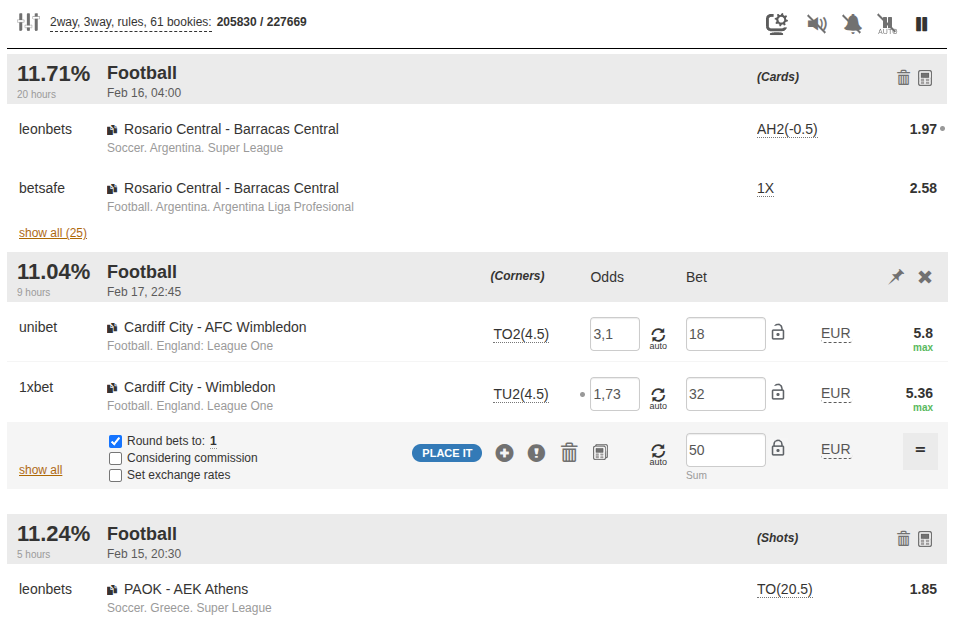
The calculator will automatically load the current odds from both bookmakers and calculate the optimal stake distribution.
Main elements
Each arm of the arb is displayed as a separate row. Let us go through the columns:
| Column | What it means |
|---|---|
| Odds | Current value at the bookmaker. The dot marks the arb initiator. Arrows show movement relative to the previous value. |
| Stake | The amount to place at this bookmaker. |
| Currency | Stake currency. You can set a different currency for each arm if your accounts use different currencies. |
| Profit | Net profit if this arm wins: the bookmaker payout (odds × stake) minus the total stake across all arms. |
The bottom row shows the total stake across all arms. By default it is taken from your filter settings, but you can change it right here.
Set the amount and check the calculation
Enter the total amount you are willing to invest in this arb. The calculator will instantly recalculate stakes across arms so that profit is even regardless of the outcome.
Make sure that:
- The odds in the calculator match what you see on the bookmaker site.
- The currency is correct for each arm.
- The stake amounts work for you.
Odds updates
By default the calculator automatically updates odds when they change on the bookmaker site. If the odds change, the calculation is recalculated automatically.
You can disable auto-update for a specific arm by clicking the toggle next to the odds. The field will then highlight when odds change, but the value will stay the same — useful if you have already placed a bet at the bookmaker.
Locking an arm
Sometimes you need to fix the amount of one arm — for example, if the bookmaker accepted a bet for a specific amount. Click the lock icon next to the stake. The calculator will then recalculate only the unlocked arms.
You can lock:
- One arm — the others will be recalculated automatically.
- The total amount — fix the overall budget across all arms.
After locking, click "Equalize profit" (the = button) to recalculate the distribution.
Rounding
Bets accurate to the penny draw bookmaker attention. Enable rounding at the bottom of the calculator — for example, to the nearest €10. The calculator will adjust amounts to look natural.
Additional settings
At the bottom of the calculator you will find additional options:
- Commission — account for bookmaker commission (relevant for betting exchanges). Enable the checkbox and specify the percentage.
- Exchange rates — if arms are in different currencies, you can set custom rates. By default the system updates rates automatically.
Proceed to placement
When the calculation is ready, click "Place bets" — event pages will open on both bookmaker sites. If you have the OddsClicker extension installed, the bet may be added to the basket automatically.
From the calculator you can also:
- Save to history — add bets to your bookkeeping for tracking and analysis.
- Report an error — if you believe the arb data is incorrect.
- Open in a separate window — the calculator will open in a new browser window, handy when working with multiple monitors.
- Pin — fix the calculator at the top of the list so it does not disappear when the feed updates.
Tips
- Always check the odds on the bookmaker site before placing a bet. If they have changed, go back to the calculator and recalculate.
- Bet on all arms. An incomplete arb is just a regular bet with risk of loss.
- Act quickly. The less time between placing the first and last arm, the lower the risk of odds changing.
- Record your results. The bookkeeping button in the calculator lets you save bets to history in one click.
May be useful